Making Rich URL Embeds for Discord
A guide for creating rich URL embeds for Discord using the Mastodon specification.
7 minute read · 1332 words
In this post, I'll show you how to create rich URL embeds for Discord using the Mastodon specification. This allows you to provide a better experience for users when they share links in Discord. Let's first start with how Discord actually creates rich embeds for links.
When you send a message with a link on Discord, their servers will fetch the URL and then start going through the html <head> element of the page. Based on testing (May 2026), Discord seems to prioritize metadata in this order:
MastodonmetadataoEmbedmetadataOpenGraph/Twitter Cardsmetadata (e.g.og:title,og:site_name,twitter:title, etc.)HTMLmeta tags (e.g.description,keywords, etc.)
Given that order, and the fact that the Mastodon specification is the most recent and actually lets you use a limited subset of HTML Formatting Elements in the content and lets you have a footer and a timestamp that will show in the user's timezone, it's the best option. Although with some caveats, which I'll explain later. So it could look like this:
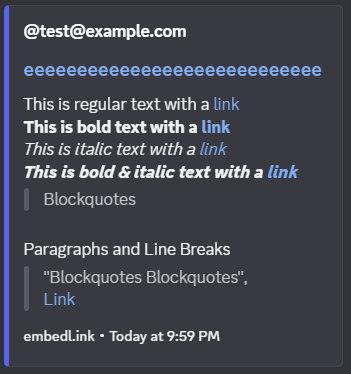
If you'd like to see the above embed for yourself, you can copy the following link from the text: "embedl.ink", and then paste it into discord and you will see the same embed I had shown above.
How does it work?
- Discord fetches your page
- Discord finds
application/activity+jsonalternate link - Discord parses
/users/-/statuses/:idand extracts the:idparameter from the URL - Discord fetches
/api/v1/statuses/:idand expects a Mastodon Status JSON object in the response - Discord builds the embed from the JSON object and displays it in the chat
Discord also will cache the page, so if you are doing testing I recommend trying to send the link with query parameters (e.g.
https://your.domain/users/-/statuses/:id?test=1) and incrementing the query parameter each time (e.g.test=2,test=3), as long as you are not re-using the same parameter. Another option would be to use Discord Embed Debugger to test your embeds.
Implementation
So you might ask, how do I actually implement this? Well all you need to do:
- Edit the page which your users will be sending, and which you'd like the embed for and add
<link rel="alternate" type="application/activity+json" href="https://your.domain/users/-/statuses/:id"> - Make sure to have an API endpoint that serves a Mastodon Status JSON object at
/api/v1/statuses/:id - Make sure to have the minimum required properties, such as:
{
  "id": "0",
  "url": "https://your.domain",
  "uri": "https://your.domain",
  "created_at": "2026-05-07T01:18:08.354Z",
  "language": "en",
  "content": "",
  "spoiler_text": "",
  "visibility": "public",
  "media_attachments": [],
  "account": {
    "id": "0",
    "display_name": "",
    "username": "insert_username",
    "acct": "insert_username",
    "url": "https://compiles.me",
    "uri": "https://compiles.me"
  }
}
The :id parameter in the URL can be any string, it doesn't have to be a number or a snowcode or anything specific but I recommend using a snowcode or some other unique identifier that can be used to determine which Mastodon Status JSON object to serve in the response. If you want to serve the same Mastodon Status for every URL, you can just use a static string or a static snowcode that decodes to some JSON object that you can ignore (e.g. {"i":"ignore", "d":"ignore"}), and then your API route can just always serve the same Mastodon status regardless of the snowcode or string.
What is a snowcode, and how do I use it?
A snowcode is basically a compact way of turning a JSON object into a numeric string that can safely be used as a URL parameter. It works by taking the JSON, converting it into a string, and then encoding each character using a predefined character set (allowedChars). Each character is replaced with its index in that set, padded to two digits (so "a" might become "00", for example), producing a long string of numbers. When the API receives the snowcode, it simply reads the digits back in pairs, converts them into characters using the same lookup table, rebuilds the JSON string, and parses it back into the original object. Here's some example code below:
const allowedChars = 'abcdefghijklmnopqrstuvwxyzABCDEFGHIJKLMNOPQRSTUVWXYZ0123456789{}[]":,.-_';
// eslint-disable-next-line @typescript-eslint/no-explicit-any
export const encodeSnowcode = (json: any) => {
  const jsonStr = JSON.stringify(json).slice(1, -1);
  let result = "";
  for (const char of jsonStr) {
    // Get the index of the character in the allowedChars string.
    const index = allowedChars.indexOf(char);
    if (index === -1) throw new Error("Character not allowed: " + char);
    // Convert the index to a two-digit string (e.g., 3 -> "03").
    const code = index.toString().padStart(2, "0");
    result += code;
  }
  return result;
};

export const decodeSnowcode = (numStr: string) => {
  const str = numStr.match(/\d+/)?.join("") ?? "";
  if (str.length % 2 !== 0) throw new Error("Invalid encoded string length.");
  let result = "";
  for (let i = 0; i < str.length; i += 2) {
    const codeStr = str.slice(i, i + 2);
    const index = parseInt(codeStr, 10);
    if (index < 0 || index >= allowedChars.length) {
      throw new Error("Invalid code: " + codeStr);
    }
    result += allowedChars[index];
  }
  const resultStr = `{${result}}`;
  return JSON.parse(resultStr);
};
Often you will see it used where the frontend will generate the application/activity+json link tag where some JSON object (e.g {"i":"anyAllowedCharsCanBeHere", "d":"maybe-a-file-name.png"}) is encoded into a snowcode using encodeSnowcode({"i":"anyAllowedCharsCanBeHere", "d":"maybe-a-file-name.png"}), where the function will generate a snowcode (e.g. 66086667660013242611111422040328070017182800132704330417046668660366676612002401047000700508110470130012046915130666) and then the html will have the link tag look like:
<link rel="alternate" type="application/activity+json" href="https://your.domain/users/-/statuses/66086667660013242611111422040328070017182800132704330417046668660366676612002401047000700508110470130012046915130666">Note: It is recommended to have the
/users/-/statuses/:snowcoderoute, but it is not required to exist. Often it is simply a 302 redirect back to the page that has that link tag.
So when the Discord (or any ActivityPub consumer) fetches the URL, it will find the activity+json link and parse out the href for the :snowcode parameter and then fetch your API route /api/v1/statuses/:snowcode.
Your API route will then need to decode the snowcode using decodeSnowcode(snowcode) to get back the original JSON object (e.g. {"i":"anyAllowedCharsCanBeHere", "d":"maybe-a-file-name.png"}), and then it can use that information to determine which Mastodon status JSON object to serve in the response, which will then be used by Discord to generate the embed.
If you don't care about the snowcode and just want to serve the same Mastodon status for every URL, you can just have a static snowcode that decodes to some JSON object that you can ignore (e.g. {"i":"ignore", "d":"ignore"}), and then your API route can just always serve the same Mastodon status regardless of the snowcode.
Caveats
Now that you know how to implement it, let's go over some of the caveats and gotchas that I found while testing this out.
1. The author field will either be: {og:title} (@{account.username}) or {account.username}@{account.domain}.
The
{og:title}property/meta tag comes from the OpenGraph specification, and the{username}and{domain}come from the Mastodon specification.
So there's not much customization to the template of embed's author field, but you can set the username property in the account object of the Mastodon Status JSON object, and then set the author_name property in the oEmbed metadata. If you don't set the author_name property in the oEmbed metadata, it will default to @{account.username}@{account.domain}.
An example of how to make a "custom" author field would be as follows:
<meta property="og:title" content="Dan (@insert_username)" />And then in the Mastodon Status JSON object:
{
  "id": "0",
  "url": "https://your.domain",
  "uri": "https://your.domain",
  "created_at": "2026-05-07T01:18:08.354Z",
  "language": "en",
  "content": "",
  "spoiler_text": "",
  "visibility": "public",
  "media_attachments": [],
  "account": {
    "id": "0",
    "display_name": "",
    "username": "insert_username",
    "acct": "insert_username",
    "url": "https://compiles.me",
    "uri": "https://compiles.me"
  }
}
This would result in the author field being Dan (@insert_username), but the url of the author field will still be https://compiles.me since that's the URL provided in the account.url property of the Mastodon Status JSON object.
Even with what I've said, technically if you can make the og:title approximately 70 characters long.

If you'd like to see the above embed for yourself, you can copy the following link from the text: "embedl.ink", and then paste it into discord and you will see the same embed I had shown above.
Note: Discord will truncate the author field to 70 characters, so if you set the og:title to be longer than that, it will be truncated and will end with an ellipsis (...). This may be useful if you want replace the "(@insert_username)" part with ... to make it look cleaner, but it may also make it look worse if the og:title is too long and gets truncated in a way that doesn't make sense.
2. The thumbnail for videos is required
Unlike the OpenGraph/Twitter Cards specifications, when providing a video as an attachment, you must provide a preview_url property which is a URL to an image that will be used as the thumbnail for the video. If you do not provide the property, the video will not show up in the embed at all.
HTML Formatting Elements
The Mastodon specification allows a limited subset of HTML formatting elements to be used in the content property of the Mastodon Status JSON object, which will then be rendered in the embed. The allowed HTML elements are: <b>, <i>, <em>, <strong>, <a>, <br>, and <p>. You may be able to use other HTML elements, but these are the only ones that are I have been able to confirm work in Discord embeds.
You can check out the following links for more information on the HTML formatting elements:
Conclusion
This was all learned from me attempting to replicate what FxEmbed does for a custom ShareX uploader. I'd also recommend you to check out Ash's EmbedLink project to play around with the interactive editor and to understand how the mastodon embeds work (you may need to select "Rich" from the Embed Type dropdown).